Install and add your key
Add the extension to Chrome, open its settings and paste your API key from OpenAI, Google Gemini or Anthropic Claude. Add your business name, a signature and, if you like, your own prompt.
Local Business Reviews adds a Reply with AI button to every review in your Google Business Profile. One click writes a reply in the language of the review and in your tone. Edit it, insert it, press Post. Free, with your own OpenAI, Gemini or Claude key.
Add the extension to Chrome, open its settings and paste your API key from OpenAI, Google Gemini or Anthropic Claude. Add your business name, a signature and, if you like, your own prompt.
Search for your business name on Google while signed in, or open Google Maps, and go to Reviews. A violet Reply with AI button appears next to every review you can answer.
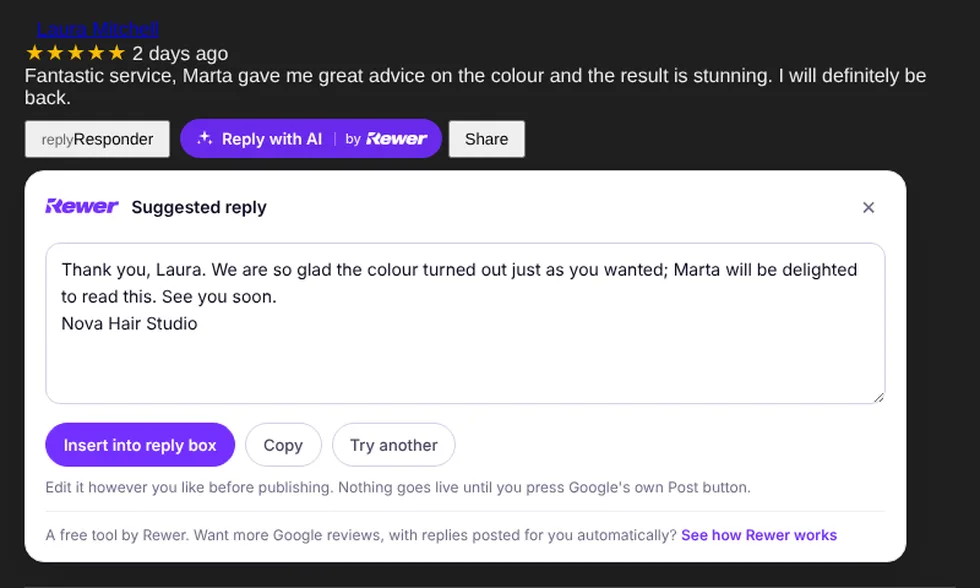
The suggested reply opens in a panel under the review. Change anything you like, insert it into Google's reply box and press Google's own Post button. Nothing goes live without you.
Google Search, Google Maps and business.google.com. No extra login, no Google reviews link to paste, nothing to configure beyond your key.
Pick a tone (warm, professional or casual), add a signature and edit the default prompt. Every reply mentions what the customer actually said, so it never reads like a template.
A sincere apology, no arguing, and an invitation to continue in private. The kind of reply the next person reading your Google reviews wants to see.
The reply comes in the language of the review by default, or in the language you choose in the settings.
Your key lives only in your browser and goes straight to the provider you chose. The extension has no servers and sends nothing to Rewer: no analytics, no accounts.
You pay your AI provider for what you use (a reply costs a fraction of a cent on most models). Rewer charges nothing for the extension.
"Fantastic service, Marta gave me great advice on the colour and the result is stunning. I'll definitely be back."
Thank you, Laura. We're so glad the colour turned out just as you wanted; Marta will be delighted to read this. See you very soon.
"Waited 40 minutes with an appointment and the cut wasn't what I asked for."
Carl, I'm sorry about the wait and that the cut wasn't what you asked for. That's not the experience we want anyone to have. Please call us or drop by so we can put it right: we'd like the chance to make it up to you.
Replies are suggestions: you always read, edit and post them yourself.
People who read your Google reviews read your replies too. A reply is public, it stays there for years, and it tells the next customer how you treat people. These are the rules the extension's default prompt follows, and the ones worth keeping if you write your own.
“Thank you for your review” sounds like a template because it is one. Naming the person and picking up something they actually said (the colour, the waiter, the Saturday wait) shows a human read it.
A short, sincere apology, no excuses and no debate, and an invitation to call or come by so you can fix it. That reply wins back the reviewer sometimes and reassures everyone who reads it next.
Two or three sentences, in the reviewer's language, with your signature. If you want to go further than replying (invitations after every visit, complaints that reach you privately, replies published for you), that is what Google reviews for business with Rewer does.
Replying well keeps your rating healthy, but the businesses that climb in Google are the ones that get a steady flow of new reviews. Rewer invites your customers to leave their Google review after a visit or a reward, keeps negative feedback private, and its Autopilot replies to every review in your tone, automatically.
A digital loyalty card in the customer's phone and, after a visit or a reward, an invitation to review you on Google.
Unhappy customers get a private channel to tell you what went wrong, so you can fix it before it becomes public.
Every new review answered in your tone, published for you, with the option to review drafts first.
Yes. The extension is free, with no account and no limits. You only pay your AI provider for the tokens you use with your own key, which usually means a fraction of a cent per reply.
OpenAI (GPT-4o mini by default), Google Gemini (Gemini 2.0 Flash) or Anthropic Claude (Claude Sonnet). You can type any model name your key has access to.
No. The extension writes a suggestion and can insert it into Google's reply box, but the reply is only published when you press Google's own Post button. If you want replies published for you, that is what Rewer's Autopilot does.
No. The extension has no servers. Your key and settings are stored in your browser (chrome.storage) and the review text is sent only to the provider you chose. Nothing is collected or sent to Rewer.
Next to the Reply button of every review you manage, in Google Search (the owner panel you see when you search for your business), in Google Maps and on business.google.com.
Yes. The settings page has the full prompt with placeholders for your business name, signature, tone and language. Restore the default at any time.
The reply comes in the language of the review by default, whatever it is. You can also force a language in the settings. The extension's interface is in English.
Link your Google listing, print the QR code sign and let every visit end with a review invitation and a ready-made reply. You're up and running in 5 minutes.
Ready in 5 minutesSecure payment with StripeNo contractWe use our own and third-party cookies for analytics and to show you personalized ads based on a profile built from your browsing habits (for example, pages visited). You can accept all cookies, reject them, or see the details in our cookie policy. Cookie policy