The review that never comes
Most of your customers won't write a review unless someone reminds them at the right moment. Your Google Business Profile doesn't show how good you are.
Rewer asks for the review for you at just the right moment, replies to every one with AI in your tone, alerts you privately when something went wrong and shows you where each review came from. Your Google Business Profile grows while you serve your customers.
And that every review that comes in gets a reply the same day.
Most of your customers won't write a review unless someone reminds them at the right moment. Your Google Business Profile doesn't show how good you are.
When someone searches “coffee shop near me,” Google shows the business with more recent reviews and a higher rating first. Even if it's worse than yours.
A review with no reply says nobody is on the other end. Google takes into account that you reply, and so do the people reading your profile. Answering all of them, every day and thoughtfully, takes time you don't have.
A sign with a QR code at the counter, and everything else happens on its own. You keep running your business.
Print the sign with your QR code and put it where customers pay. They scan it with their phone camera and we ask how it went. The same review link works on an NFC tag, in a WhatsApp message or in an email. It takes them to the review screen of your profile, but asks first and measures afterwards.
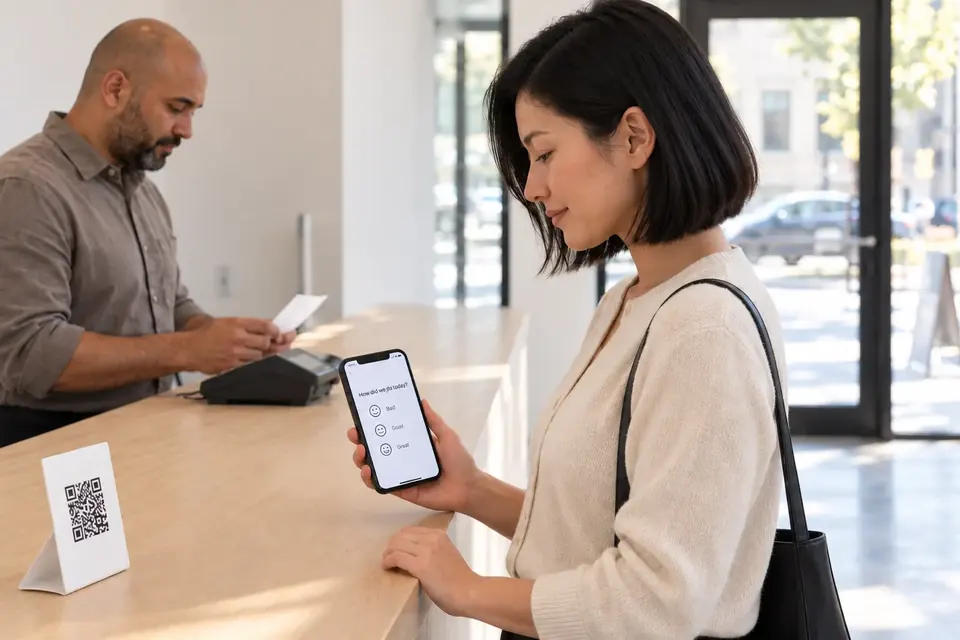
If it went well, one tap takes them to the write-a-review screen on your Google Business Profile. Right when they most feel like doing it, without you asking at the register or texting them three days later. Always real customers, and never in exchange for anything. And if something didn't go as expected, you're the first to hear about it.
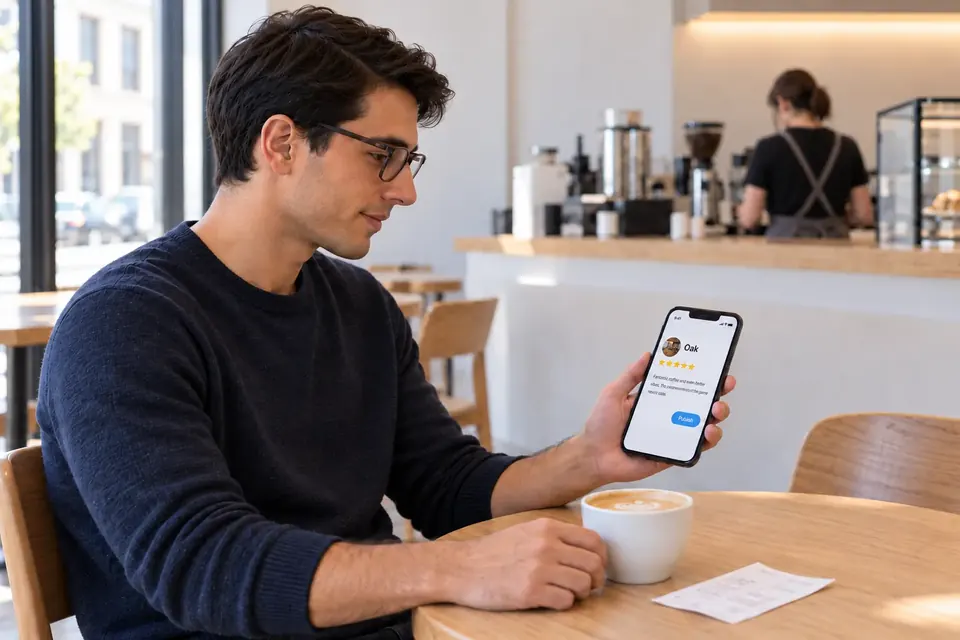
Every new review lands in your dashboard with a reply already written: friendly, professional or playful, signed by you. Publish it in one click, or let Autopilot answer 4 and 5 star reviews on its own. Anything 3 stars or below always goes through you first.

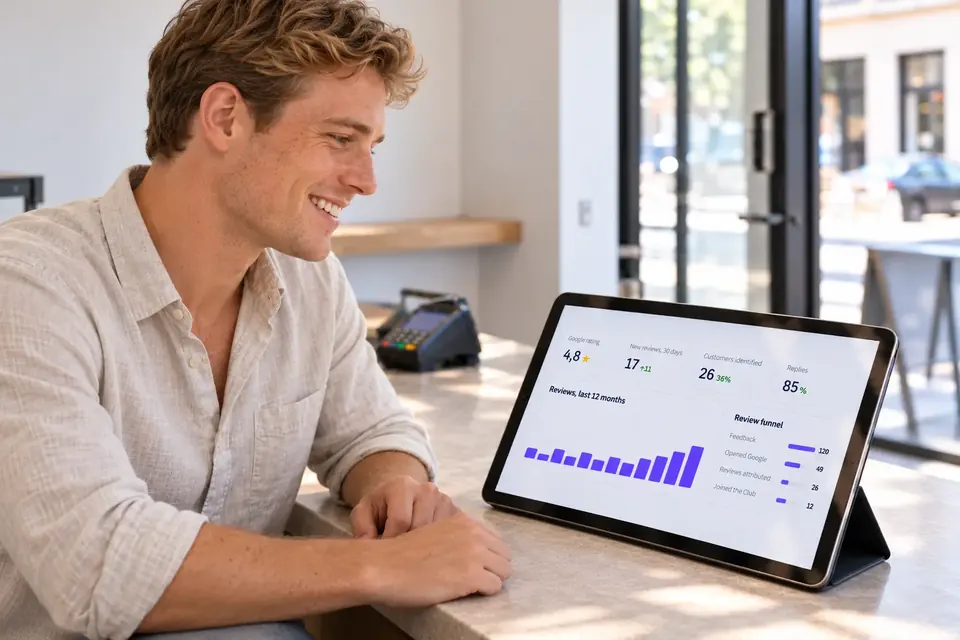
Link your Business Profile when you create your account and setup is done. From then on, everything is in one dashboard: average rating, new reviews, where each one came from (QR code, WhatsApp or unprompted), which ones still need a reply, and the suspicious profiles worth reporting.
Any review QR code or link takes people to the review screen of your Google Business Profile. So does Rewer. The difference is what happens before and after that link.
A link is just a link. Rewer is everything else.
This is how the AI writes. Fast, specific and in your tone; no arguing and no customer details.
“Fantastic coffee and even better service. The perfect spot to get some work done.”
Thank you, Laura! We love that the window corner has become your office. Your usual coffee will be waiting.
“The food was fine, but we waited 40 minutes for a table we had reserved.”
Javier, you're absolutely right, and we apologize: a reservation is a reservation. We've looked into what happened that day so it doesn't happen again. We'd like to make it up to you: send us a message and we'll sort it out.
Replies are written in the language of the review and only use what you've told us about your business.
A lot of people search for how to delete negative Google reviews. The short answer: a business can't remove them. Google takes them down when they violate its policies (spam, conflicts of interest, offensive content, experiences that never happened), or the author can delete their own. What is in your hands is more useful than it seems.
A negative review with a calm, specific reply reassures whoever reads it next. And Google notices that you reply. With Rewer, the reply is written before you've even read the review.
If a review comes from someone who was never a customer, or from an account created to do harm, report it from your Google Business Profile. Rewer flags profiles with a pattern of negative reviews so you can report them with evidence.
With the private complaint channel, an unhappy customer has someone to tell before they go to Google. Resolving a complaint in time often wins the customer back.
Buying Google reviews, or “guaranteed” 5 star reviews, is a deceptive practice banned by consumer protection law in the US, the UK and the EU. Google goes after them and can remove them or even penalize your whole profile. The legal alternative is simpler: ask your real customers for a review at the right moment. That's exactly what Rewer does.
It doesn't matter what you sell: if you serve customers and have a Google Business Profile, the same QR code, the same invite and the same AI replies work just the same. And if you work at customers' homes or remotely, the review link goes out by WhatsApp or email.
All in one dashboard focused on what matters: your Google reviews.
Asking every customer for a review at just the right moment multiplies the ones you get. More recent reviews and a higher rating mean climbing the rankings on Google Maps.
Every new review gets a reply in your tone within minutes, not weeks. People reading your profile see a business that listens, and the AI never argues or shares anyone's details.
The dashboard separates the reviews that come in through the counter QR code, through the WhatsApp link and on their own, location by location. You know what's working and where a sign is missing.
The QR code invites, the AI writes and the dashboard alerts you. No asking for reviews one by one, no logging into Google every day, no spreadsheets.
Less than it costs you every time a customer picks the place next door because it has more stars on Google.
Google reviews, AI replies and private complaints
$59/month
Billed yearly: $649
10 or more? See Enterprise.
Get started10 locations or more
Custom
Prices in US dollars, taxes not included. Billed in euros in the euro area and in pounds in the UK. Card payment through Stripe, monthly or yearly, no contract: cancel anytime from your dashboard and the service stays active until the end of the paid period. One plan with the full product: you pay per location, and you can add or pause locations anytime from your dashboard.
A review QR code or link does one thing: it opens the review form of your profile. It doesn’t ask, doesn’t pick the moment and can’t tell a happy customer from one who’s leaving upset. Rewer goes to the same place, but first asks how it went with a single tap, right at the end; if it went badly, the complaint reaches you privately; and afterwards it replies to every review with AI, shows you how many come from the QR code, from WhatsApp or on their own, and flags suspicious profiles. A link is only the beginning.
Ask at the right moment, don't nag, and make it easy. With Rewer, the customer scans the QR code at the counter when they're done, says how it went and, if it went well, one tap takes them to the write-a-review screen on your Google Business Profile. If you'd rather ask in person, a line that works is: “A review on Google really helps us. The QR code is right here.”
Yes. Google lets you ask your customers for reviews, and in fact recommends it. What it bans is paying or rewarding for the review, asking only the customers you know will rate you highly, writing it yourself or buying it. Consumer law doesn't stop you either: what it bans are fake or paid reviews. Rewer invites your real customers after their visit, and the invite is never tied to a reward.
No, and Rewer doesn't. Google's policies ban incentivized reviews, and Google can remove them or penalize your profile. Rewer's invite is never tied to a reward or a discount: the customer freely decides whether to leave a review and what rating to give.
It's a QR code that takes customers straight to the “write a review” screen on your Google Business Profile, without having to search for you. Rewer generates one for each location, along with a sign that's ready to print. Before sending anyone to Google, it asks how the visit went, so complaints reach you privately. The same review link works for WhatsApp, email or an NFC card.
Yes: an NFC card just stores a link, and you can write the Rewer review link onto it. The advantage of doing it this way, instead of a plain link, is that reviews that come in through it are attributed to the counter in your dashboard, and complaints go through you first.
Not by the business. Only Google removes them, and only when they violate its policies: you can report them from your Google Business Profile. The author can also delete it, and in serious cases there's the legal route, which is slow and expensive. What you can do is reply well (with Rewer the reply is written before you've read it), report reviews from suspicious profiles with evidence, and give your customers a private channel for complaints.
Fast, calmly and specifically: thank them, acknowledge what went wrong without excuses, say what you'll change and offer to continue privately. Never argue or share customer details. Rewer's AI writes the reply by these rules and in your tone, and you review it before it goes out: reviews of 3 stars or less are never published on their own.
You decide. In manual mode, every review comes with a suggested reply that you publish in one click (or edit first). With Autopilot on, 4 and 5 star reviews are answered and published automatically in your tone; anything 3 stars or below always waits for you to review it.
Short, sincere ones, said right as they finish: “If you enjoyed it, a review on Google really helps us. The QR code is right here,” or, over WhatsApp, “Thanks for coming in. If you have a minute, here's where you can leave us a review on Google.” Never ask for a rating or promise anything in return. With Rewer the invite goes out on its own with the right wording, in the customer's language.
No. They scan the QR code with their phone camera, or open the link you send them on WhatsApp, and leave their review on Google with the Google account they already have. No apps, no sign-ups, no passwords.
Yes, that's where your reviews live. If you don't have one yet, you can create it for free on Google; verification can take a few days. When you set up your business in Rewer, you link your Google account in one click and pick your profile (or one per location): no copying links or IDs.
It depends on how many customers you serve and how they leave your business: no one can guarantee you a number, and be wary of anyone who does. What changes with Rewer is that you ask every customer at the best moment, with no effort, and you can see in the dashboard how many reviews came in through the QR code, how many through WhatsApp and how many on their own.
Your dashboard in 9 languages and your customers in 11: Spanish, English, Catalan, French, Italian, German, Portuguese, Dutch, Chinese and Russian, plus Latin American Spanish. Every customer sees the question, the invite and the complaint form in their own language, and the AI replies to each review in the language it was written in.
If you have a Google Business Profile and customers to serve, yes: restaurants, salons, clinics, repair shops, stores, gyms, hotels, real estate agencies, schools, law firms… The QR code and the sign are for the people who walk into your location; the review link by WhatsApp or email is for the customers you serve at their home, over the phone or remotely. The AI replies use what you tell us about your business, so they talk about what you actually do.
There's one plan with the full product, priced per location: $59 a month per location (or $649 a year, with 1 month free), no contract. It includes the reviews QR code and sign, the link for WhatsApp and NFC, the invites, private complaints, unlimited AI replies, the dashboard and the alerts. You can add or pause locations anytime from your dashboard, and you're only charged for the rest of the period. From 10 locations, Enterprise has volume pricing. Prices don't include taxes; in the euro area you're billed in euros (49 € a month per location) and in the UK in pounds (£45).
Link your Google Business Profile, print the sign with the QR code, and let every visit end with a review and a ready-made reply. You're up and running in 5 minutes.
Ready in 5 minutesSecure payment with StripeNo contractWe use our own and third-party cookies for analytics and to show you personalized ads based on a profile built from your browsing habits (for example, pages visited). You can accept all cookies, reject them, or see the details in our cookie policy. Cookie policy